Announcement

Collapse
No announcement yet.

Shoutbox Mod for vBulletin 5 & 6

Collapse
This is a sticky topic.
X
X
Collapse
First Prev Next Last
 
  • Filter
  • Time
  • Show
Clear All
new posts

    Paid Mod Shoutbox Mod for vBulletin 5 & 6

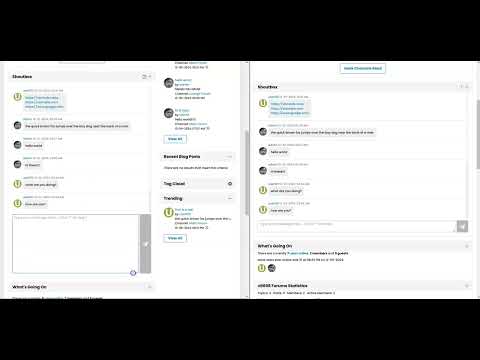
    Introducing the Shoutbox mod for vBulletin 5 and 6, a simple, interactive chat feature for your community that enhances user engagement and interaction. This mod provides an easy-to-integrate Shoutbox where members can send real-time messages and interact with each other. 😎

    Key Features:
    • Real-time Messaging: Shoutbox messages are automatically fetched based on a customizable polling frequency, ensuring new messages appear without refreshing the page. If a user switches tab or application, or minimizes the browser window, the polling is paused to prevent unnecessary requests to the server. When they come back to the tab where the Shoutbox is loaded, it resumes and immediately attempts to fetch new messages.
    • Infinite Scrolling: Offers users the ability to scroll to the top to automatically fetch older messages and to the bottom to fetch new ones.
    • Messages Per Scroll: You can set the maximum number of messages per scroll to fetch older and new messages by batch..
    • Customizable User Permissions: You have full control over who can post and view messages in the Shoutbox,
    • Flood Check: You can configure if flood check is enabled to minimize spamming and which usergroups can bypass flood checks.
    • Message Pruning: Automatically remove messages older than a set number of days to keep the Shoutbox clean and manageable.
    • Message Maximum Length: You can specify the maximum length of a Shoutbox message.
    • Message List Maximum Height: You can specify the maximum height for the Shoutbox message list in pixels before the vertical scrollbar appears.
    • Resizable Input Area: Users can resize the message input box for convenience, especially for longer messages.
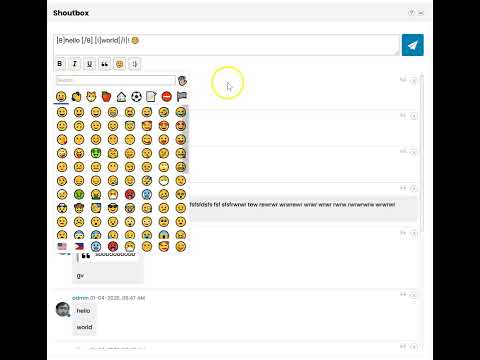
    • Emojis and Links: Users can insert emojis and posted URLs are automatically converted into clickable hyperlinks.
    • Help Feature: A built-in Help button provides a modal with instructions for users on how to interact with the Shoutbox effectively.

    Compatibility:
    • Compatible with self-hosted vB5 and vB6.
    • Not compatible with vBCloud as this mod requires uploading a custom API and creating a new database table which are not allowed in vBCloud.

    Price:
    $50 (Branding-free)​
    Buy Now Add to Cart View Cart​​​​​​


    Shoutbox Settings in AdminCP:
    Click image for larger version  Name:	image.png Views:	1743 Size:	306.0 KB ID:	31022
    Click image for larger version  Name:	image.png Views:	7 Size:	221.3 KB ID:	31274

    Shoutbox Module Configuration in Sitebuilder:
    Click image for larger version  Name:	image.png Views:	132 Size:	345.9 KB ID:	31023

    Version History:
    v2.5
    • Fixed compatibility with vB 6.2.1.

    v2.4
    • Resolved a bug introduced in v2.3 affecting vB5.
    • This version is optional for vB6. The Shoutbox will function correctly with or without it as long as v2.3 is installed.

    v2.3
    • Fixed issue in vB 6.1.3 where "simpleversion" was removed by vBulletin from the templates.

    v2.2
    • Fixed misplaced online icon when posting the very first Shoutbox message.
    • Fixed garbled username in online status tooltip text (e.g. "%1$s is online now") for the first Shoutbox message on page load. This was caused by delayed rendering in templates employed by vBulletin.​
    v2.1
    • Fixed PHP Warnings generated by Shoutbox API.​
    v2.0
    • Toolbar buttons provided for inserting Bold, Italic, and Underline.
    • Toolbar buttons provided for inserting Quote, Emoji, Smiley, Image and User Mention.
      1. For mobile and tablet devices, the Emoji button is not present since inserting emoji is already available in the virtual keyboard.
      2. Quote button is also available above each message to be able to easily quote an existing message.
    • URL Preview is also available if you enabled it in Settings > Options > BB Code Settings. It should work the same way it works in forum posts where it shows URL Preview if the URL is in its own line.
    • You can configure to show the latest messages at the bottom or the top.
    • You can configure to show the message input box and toolbar buttons at the bottom or the top.
    • You can configure which usergroups can delete any messages.
    • You can configure which usergroups can delete their own messages.
    • You can configure to show or hide the avatar.
    • You can configure to show or hide the online status icon.
    • The message input box auto-grows as you type your message with multiple lines.
    • For mobile and tablet devices which don't have a Shift key in the virtual keyboard, pressing the Enter key inserts a line break instead of sending the message. This allows mobile and tablet users to insert a line break in the message. For desktop, pressing the Enter key still sends the message and pressing Shift+Enter inserts a line break.
    • When you update a setting in Settings > Options > [vBMods.rocks] Shoutbox That Rocks Settings, users who already have the Shoutbox module loaded will be automatically prompted to reload the page for the changes to take effect.
    v1.0
    • Initial version.

    Demo:


    This mod is also installed here at:

    Join the conversation in the Shoutbox! Send real-time messages, interact with others, and stay connected in this interactive chat feature.


    Price:
    $50 (Branding-free)​
    Buy Now Add to Cart View Cart

    Need help or not comfortable installing this mod? Purchase the installation service below:

    Product Installation Add-On: $20
    Purchase this product add-on to get professional installation of this mod from us.

    Add to Cart View Cart


    Don't have a PayPal account yet or want to use a new account to purchase this mod? Sign up with PayPal now and get $5 reward!

    Want to pay using Credit/Debit Card? Contact us and we will send you an invoice where you can use your own card.

    ​​​​​
    Coming Soon:
    Stay tuned for upcoming updates and more features. This mod in in continuous development to improve it based on your feedback, so feel free to share any ideas or concerns.

    Final Thoughts:
    The Shoutbox plugin is a great addition to any vBulletin-powered community. It encourages real-time interaction and adds an extra layer of engagement that your users will love. I hope you enjoy using it as much as I enjoyed developing it!

    Thank you for your time, and I look forward to hearing your thoughts and feedback!

    Last edited by glennrocksvb; 05-12-2026, 10:12 AM. Reason: Released v2.5
    Buy me a coffeePayPal QR Code
    My Amazon Affiliate Link
    Fast vBulletin VPS Host:
    This site is hosted by IONOS

    #2
    These are the new features that I'm thinking of adding:
    1. Ability to delete messages
      1. Ability to configure which users or usergroup who can delete any message.
      2. Ability to configure which usergroup can delete their own message.
    2. Ability to mention users.
    3. Ability to post BBCodes.
    4. Ability to post animated GIFs similar to this GIPHY mod.
    5. Ability to pin messages. Pinned messages will be excluded from the old message pruning cron job.
    What do you think? Do you have other features in mind?
    Buy me a coffeePayPal QR Code
    My Amazon Affiliate Link
    Fast vBulletin VPS Host:
    This site is hosted by IONOS

    Comment


      #3
      Originally posted by glennrocksvb View Post
      These are the new features that I'm thinking of adding:
      1. Ability to delete messages
        1. Ability to configure which users or usergroup who can delete any message.
        2. Ability to configure which usergroup can delete their own message.
      2. Ability to mention users.
      3. Ability to post BBCodes.
      4. Ability to post animated GIFs similar to this GIPHY mod.
      5. Ability to pin messages. Pinned messages will be excluded from the old message pruning cron job.
      What do you think? Do you have other features in mind?
      Big +1 to all of these proposed features. I am absolutely planning on purchasing this at some point. Are vBulletin configured smilies integrated? That would be a big thing along with the BBCode/GIFs. And from reading the screenshots, I can see that guests are unable to post - would that be something that could be optional in the future?

      Thanks so much for this. It's obvious that the community wanted a product like this for vB6 and it was proving to be too frustrating to try and get one done myself, so I opted for a Discord integration to work much the same way. But it's not vBulletin integrated so it felt kinda janky.

      Comment


        #4
        Thanks for the feedback!

        For guest posting, how would you know who you are talking to if there are multiple guests joining the conversation?

        As per the smileys, are emojis not better than smileys? Do you want them both supported?
        Buy me a coffeePayPal QR Code
        My Amazon Affiliate Link
        Fast vBulletin VPS Host:
        This site is hosted by IONOS

        Comment


          #5
          Originally posted by glennrocksvb View Post
          Thanks for the feedback!

          For guest posting, how would you know who you are talking to if there are multiple guests joining the conversation?

          As per the smileys, are emojis not better than smileys? Do you want them both supported?
          Guest posting: Could be a temporary username they choose that gets stored in a cookie, maybe checked against the member list to ensure it's unique. My forum is not very active and mostly just exists for members from 10+ years ago to randomly stumble back to and say hello. Sometimes it's nice to just post a quick message without any registration obligations. But that's definitely not a deal breaker or even something I've thought through much, just an initial idea.

          For smilies, I would definitely want them to be parsed as if they were forum posts, with the ability to use the ones we define in the Admin CP. My community has a ton of custom ones that aren't the same as the "Standard" set you can get with a fresh vBulletin install, nor the universal set accessed with the 'Win + .' shortcut.

          Comment


          • glennrocksvb
            commented
            Editing a comment
            Noted. Thanks for the explanation.

          #6
          Sneak peek of upcoming new features
          • User online status
          • URL Preview
          • Delete messages
          • Smileys
          • BBCodes
          • User mentions


          Still a work in progress...Buttons will be provided for inserting BBCodes, smileys and user mentions so you don't have to type them manually.

          Stay tuned for more updates!
          Last edited by glennrocksvb; 12-30-2024, 05:51 PM.
          Buy me a coffeePayPal QR Code
          My Amazon Affiliate Link
          Fast vBulletin VPS Host:
          This site is hosted by IONOS

          Comment


            #7
            Just installed it, super easy. Gotta figure out how to style it because it looks pretty bad with my skin But that's an easy tweak. Thanks again for the product!

            edit: Found the css template. Should be smooth sailing

            Comment


              #8
              Thanks for your purchase, hyper22!

              Are you using a dark theme? To customize, use css_additional.css template for now. I don't recommend editing the included Shoutbox CSS template as you may get template merge conflicts whenever there are new updates to the mod. I will create style variables in the next release to customize the styles easily without modifying any templates.
              Buy me a coffeePayPal QR Code
              My Amazon Affiliate Link
              Fast vBulletin VPS Host:
              This site is hosted by IONOS

              Comment


              • hyper22
                commented
                Editing a comment
                Appreciate the tip. Can't wait to get feedback from my community

              #9
              Please let me know if you need help customizing the styles.
              Buy me a coffeePayPal QR Code
              My Amazon Affiliate Link
              Fast vBulletin VPS Host:
              This site is hosted by IONOS

              Comment


                #10
                Originally posted by hyper22 View Post
                Can't wait to get feedback from my community
                Exciting!
                Happy Jeff Goldblum GIF by Apartments.com
                Buy me a coffeePayPal QR Code
                My Amazon Affiliate Link
                Fast vBulletin VPS Host:
                This site is hosted by IONOS

                Comment


                  #11
                  No help needed with the styling, thanks though! Playing with it I do have some goals to reach with it regarding the styling so I will be having some fun working on that. When I do get it how my "vision" is I will be sure to share the example.

                  Is there a simple way to flip the order of the messages so new ones are on top instead of bottom? I think that's how most of these worked in the old days but maybe I'm misremembering.

                  Comment


                    #12
                    Originally posted by hyper22 View Post
                    Is there a simple way to flip the order of the messages so new ones are on top instead of bottom? I think that's how most of these worked in the old days but maybe I'm misremembering.
                    It's not that easy to flip the order. I've never seen a chat in reverse order. Chats usually display the latest messages at the bottom.

                    I can make the order a configurable option to make it more flexible.
                    Buy me a coffeePayPal QR Code
                    My Amazon Affiliate Link
                    Fast vBulletin VPS Host:
                    This site is hosted by IONOS

                    Comment


                      #13
                      I didnt even notice that. Yes my chatbox has latest on top but its not a deal breaker

                      Comment


                        #14
                        Here are my options in the backend. For the order.

                        Click image for larger version

Name:	image.png
Views:	228
Size:	27.6 KB
ID:	31084

                        Comment


                          #15
                          I will make the order configurable in the next release
                          Buy me a coffeePayPal QR Code
                          My Amazon Affiliate Link
                          Fast vBulletin VPS Host:
                          This site is hosted by IONOS

                          Comment

                          Latest Posts

                          Collapse

                          Working...
                          X
                          Searching...Please wait.
                          An unexpected error was returned: 'Your submission could not be processed because you have logged in since the previous page was loaded.

                          Please push the back button and reload the previous window.'
                          An unexpected error was returned: 'Your submission could not be processed because the token has expired.

                          Please push the back button and reload the previous window.'
                          An internal error has occurred and the module cannot be displayed.
                          There are no results that meet this criteria.
                          Search Result for "|||"