Announcement

Collapse
No announcement yet.

Shoutbox Mod for vBulletin 5 & 6

Collapse
This is a sticky topic.
X
X
Collapse
First Prev Next Last
 
  • Filter
  • Time
  • Show
Clear All
new posts

    #46
    Does the missing Image icon only happen on iOS and not on Android and Desktop? The icon is pointing to "js/ckeplugins/image2/icons/image_default.png" which is the same image used for the Image icon in CKEditor. Check the CKEditor if the same icon is also missing there. And also check your server if that file is present in that path.

    For the glowing online status icon, that's not really part of the Shoutbox mod. It must be coming from this mod which was created before Shoutbox.

    No animated gif. No jQuery animation. No additional image. Just pure CSS3 animation coolness. :cool: Add this in css_additional template in AdminCP or via Sitebuilder > Style > CSS Editor: /* Online icon "Glow" - START */ .b-userinfo__icon.online .b-icon-fa, .profile_sidebar_content .online-status.online .b


    The positioning needs to be adjusted for Shoutbox

    Buy me a coffeePayPal QR Code
    My Amazon Affiliate Link
    Fast vBulletin VPS Host:
    This site is hosted by IONOS

    Comment


      #47
      Can you send me latest version of Shoutbox again? My theme author updated theme so now i can update whole things.

      Thank you.

      Comment


      • glennrocksvb
        commented
        Editing a comment
        Done, check your PayPal email.

      • Mikk
        commented
        Editing a comment
        Thanks glenn u rocks!

      #48
      Originally posted by glennrocksvb View Post
      Does the missing Image icon only happen on iOS and not on Android and Desktop?
      Hello Glenn,

      I have checked this. The icon seem to miss only on iOS. Do you have a chance to fix this?

      Frank

      Comment


      • glennrocksvb
        commented
        Editing a comment
        But the image file "js/ckeplugins/image2/icons/image_default.png" is present on the server?

      • flohse
        commented
        Editing a comment
        Image is on the server.

      • glennrocksvb
        commented
        Editing a comment
        That's odd that iOS can't find it. I will look into it.

      #49
      Originally posted by glennrocksvb View Post
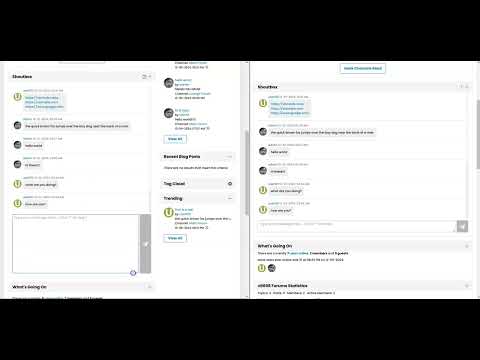
      Introducing the Shoutbox mod for vBulletin 5 and 6, a simple, interactive chat feature for your community that enhances user engagement and interaction. This mod provides an easy-to-integrate Shoutbox where members can send real-time messages and interact with each other.

      Key Features:
      • Real-time Messaging: Shoutbox messages are automatically fetched based on a customizable polling frequency, ensuring new messages appear without refreshing the page. If a user switches tab or application, or minimizes the browser window, the polling is paused to prevent unnecessary requests to the server. When they come back to the tab where the Shoutbox is loaded, it resumes and immediately attempts to fetch new messages.
      • Infinite Scrolling: Offers users the ability to scroll to the top to automatically fetch older messages and to the bottom to fetch new ones.
      • Messages Per Scroll: You can set the maximum number of messages per scroll to fetch older and new messages by batch..
      • Customizable User Permissions: You have full control over who can post and view messages in the Shoutbox,
      • Flood Check: You can configure if flood check is enabled to minimize spamming and which usergroups can bypass flood checks.
      • Message Pruning: Automatically remove messages older than a set number of days to keep the Shoutbox clean and manageable.
      • Message Maximum Length: You can specify the maximum length of a Shoutbox message.
      • Message List Maximum Height: You can specify the maximum height for the Shoutbox message list in pixels before the vertical scrollbar appears.
      • Resizable Input Area: Users can resize the message input box for convenience, especially for longer messages.
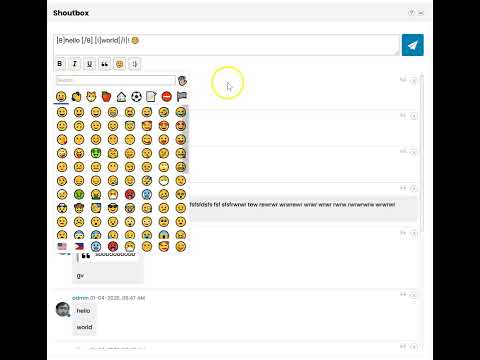
      • Emojis and Links: Users can insert emojis and posted URLs are automatically converted into clickable hyperlinks.
      • Help Feature: A built-in Help button provides a modal with instructions for users on how to interact with the Shoutbox effectively.

      Compatibility:
      • Compatible with self-hosted vB5 and vB6.
      • Not compatible with vBCloud as this mod requires uploading a custom API and creating a new database table which are not allowed in vBCloud.

      Price:
      $50 (Branding-free)​
      Buy Now Add to Cart View Cart​​​​​​


      Shoutbox Settings in AdminCP:
      Click image for larger version Name:	image.png Views:	1743 Size:	306.0 KB ID:	31022
      Click image for larger version Name:	image.png Views:	7 Size:	221.3 KB ID:	31274

      Shoutbox Module Configuration in Sitebuilder:
      Click image for larger version Name:	image.png Views:	132 Size:	345.9 KB ID:	31023

      Version History:
      v2.2
      • Fixed misplaced online icon when posting the very first Shoutbox message.
      • Fixed garbled username in online status tooltip text (e.g. "%1$s is online now") for the first Shoutbox message on page load. This was caused by delayed rendering in templates employed by vBulletin.​
      v2.1
      • Fixed PHP Warnings generated by Shoutbox API.​
      v2.0
      • Toolbar buttons provided for inserting Bold, Italic, and Underline.
      • Toolbar buttons provided for inserting Quote, Emoji, Smiley, Image and User Mention.
        1. For mobile and tablet devices, the Emoji button is not present since inserting emoji is already available in the virtual keyboard.
        2. Quote button is also available above each message to be able to easily quote an existing message.
      • URL Preview is also available if you enabled it in Settings > Options > BB Code Settings. It should work the same way it works in forum posts where it shows URL Preview if the URL is in its own line.
      • You can configure to show the latest messages at the bottom or the top.
      • You can configure to show the message input box and toolbar buttons at the bottom or the top.
      • You can configure which usergroups can delete any messages.
      • You can configure which usergroups can delete their own messages.
      • You can configure to show or hide the avatar.
      • You can configure to show or hide the online status icon.
      • The message input box auto-grows as you type your message with multiple lines.
      • For mobile and tablet devices which don't have a Shift key in the virtual keyboard, pressing the Enter key inserts a line break instead of sending the message. This allows mobile and tablet users to insert a line break in the message. For desktop, pressing the Enter key still sends the message and pressing Shift+Enter inserts a line break.
      • When you update a setting in Settings > Options > [vBMods.rocks] Shoutbox That Rocks Settings, users who already have the Shoutbox module loaded will be automatically prompted to reload the page for the changes to take effect.
      v1.0
      • Initial version.

      Demo:


      This mod is also installed here at:
      Join the conversation in the Shoutbox! Send real-time messages, interact with others, and stay connected in this interactive chat feature.


      Price:
      $50 (Branding-free)​
      Buy Now Add to Cart View Cart

      Need help or not comfortable installing this mod? Purchase the installation service below:

      Product Installation Add-On: $20
      Purchase this product add-on to get professional installation of this mod from us.

      Add to Cart View Cart


      Don't have a PayPal account yet or want to use a new account to purchase this mod? Sign up with PayPal now and get $5 reward!

      Want to pay using Credit/Debit Card? Contact us and we will send you an invoice where you can use your own card.

      ​​​​​
      Coming Soon:
      Stay tuned for upcoming updates and more features. This mod in in continuous development to improve it based on your feedback, so feel free to share any ideas or concerns.

      Final Thoughts:
      The Shoutbox plugin is a great addition to any vBulletin-powered community. It encourages real-time interaction and adds an extra layer of engagement that your users will love. I hope you enjoy using it as much as I enjoyed developing it!

      Thank you for your time, and I look forward to hearing your thoughts and feedback!
      Hello Glenn. I was wondering how can you change the text color for the Shoutbox? I want to change the text color from black to white for certain themes.

      Comment


      • glennrocksvb
        commented
        Editing a comment
        Check the readme file which contains CSS customization guidelines. Changing the background of the shoutbox post text should make the text readable.

      #50
      Hello,


      Any idea?

      We tried to look this and situation is this:

      The most interesting thing is that fetchShoutboxMessages works fine most of the time, then randomly one request messes up (nothing changes in request, response is empty) and it returns an error. After that, again works fine

      Comment


        #51
        Click image for larger version

Name:	Screenshot 2025-03-31 at 18.44.14.png
Views:	439
Size:	23.1 KB
ID:	32134 this is error msg what come no idea where this lost previous post

        Comment


          #52
          Originally posted by Mikk View Post
          The most interesting thing is that fetchShoutboxMessages works fine most of the time, then randomly one request messes up (nothing changes in request, response is empty) and it returns an error. After that, again works fine
          If it works most of the time and randomly happens one time then you probably have unstable internet connection? Otherwise, please check the errors logs on the server if there's any PHP error logged at the time of the failed request.
          Last edited by glennrocksvb; 03-31-2025, 09:15 AM.
          Buy me a coffeePayPal QR Code
          My Amazon Affiliate Link
          Fast vBulletin VPS Host:
          This site is hosted by IONOS

          Comment


          • Mikk
            commented
            Editing a comment
            We tested all this, and not only me

          • glennrocksvb
            commented
            Editing a comment
            Ok, please check the error logs on the server.

          #53
          The Shoutbox titlebar is drawn over the emoji popup.

          See picture.

          Click image for larger version

Name:	image.png
Views:	99
Size:	98.8 KB
ID:	32441
          Happens on Windows 11 with Edge and on macOS with Safari.

          Frank

          Comment


            #54
            The z-index of the module title bar looks like higher than that of the emoji picker in the theme you're using. To fix it, you have to adjust the z-index of the emoji picker by adding this custom CSS in css_additional.css template:

            Code:
            .shoutbox__emoji-picker {
                z-index: 100;
            }
            Adjust the value 100 accordingly. Inspect the Shoutbox module title bar with the "widget-header" class in the browser DevTools (right-click and choose Inspect) and check its z-index. The emoji-picker should have a higher value than that.
            Buy me a coffeePayPal QR Code
            My Amazon Affiliate Link
            Fast vBulletin VPS Host:
            This site is hosted by IONOS

            Comment


              #55
              This fixes the issue. Thanks.

              Frank

              Comment


              • glennrocksvb
                commented
                Editing a comment
                Glad to help.

              #56
              Hello Glenn,

              I have just test installed vBulletin 6.1.3. The Shoutbox seems to be broken since the update. The Help Button is missing and you can't send any messages in the Shoutbox. Can you please take a look and probably provide a fix?

              Thanks in advance.

              Frank

              Comment


              • glennrocksvb
                commented
                Editing a comment
                Thanks for reporting. I'll take a look when I get to my hotel. I'm currently out of the country.

              #57
              I have released v2.3 to fix the issue in vB 6.1.3. Customers who have purchased this product should receive an email containing the download link
              Buy me a coffeePayPal QR Code
              My Amazon Affiliate Link
              Fast vBulletin VPS Host:
              This site is hosted by IONOS

              Comment


              • flohse
                commented
                Editing a comment
                I just wanted to report back that the new version works like a charm with vBulletin 6.1.3. This was an outstanding time to fix. This was lightspeed.

              #58
              Hello.
              After updating to Shoutbox That Rocks v2.3, I started seeing this message in all forum posts. How can I fix it?
              Click image for larger version

Name:	image.png
Views:	75
Size:	5.2 KB
ID:	32664
              Thanks​

              Comment


              • glennrocksvb
                commented
                Editing a comment
                Are you on vB5 or vB6? If you disable the Shoutbox mod, does it still show that error?

              #59
              Hello Glenn,
              Yes, I'm using vBulletin 6.1.3.
              I've already tried disabling Shoutbox That Rocks v2.3 and completely uninstalling it, but the error persists.
              Best regards​

              Comment


              • glennrocksvb
                commented
                Editing a comment
                When you disabled or uninstalled the Shoutbox mod, did the error still show up on forum posts? It seems the error is unrelated to the mod if the error is showing up on forum posts. Shoutbox messages are separate from forum posts.. Could you post a screenshot of the error?

              #60
              then I don't know what the problem is, I just know that the error occurred after the update of Shoutbox That Rocks v2.3.
              Click image for larger version  Name:	image.png Views:	0 Size:	81.7 KB ID:	32673https://esperformance.net/forum/foru...enden#post9935

              Comment


              • glennrocksvb
                commented
                Editing a comment
                Maybe you did something unrelated to Shoutbox installation while you were updating the mod?

            Latest Posts

            Collapse

            Working...
            X
            Searching...Please wait.
            An unexpected error was returned: 'Your submission could not be processed because you have logged in since the previous page was loaded.

            Please push the back button and reload the previous window.'
            An unexpected error was returned: 'Your submission could not be processed because the token has expired.

            Please push the back button and reload the previous window.'
            An internal error has occurred and the module cannot be displayed.
            There are no results that meet this criteria.
            Search Result for "|||"