

Another question, just for peace of mind. Are inputs sanitized/protected against things like sql injection?
-
-
Kubes, I responded to your question in the Shoutbox. You can add the Shoutbox module on any page or on any section on a page just like most of the built-in modules.
 My Amazon Affiliate Link
Fast vBulletin VPS Host:
This site is hosted by IONOSComment
-
This is super exiting for our communities!Comment
-
More v2.0 updates coming soon!- Toolbar buttons now provided for Bold, Italic, Underline, Quote, Emoji and Smiley
- New configurations for displaying the latest messages at the top and the message input box to the top.
- …and more!
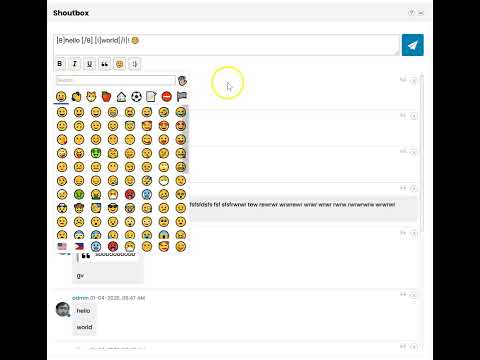
What are you waiting for, get this mod...
 My Amazon Affiliate Link
Fast vBulletin VPS Host:
This site is hosted by IONOSComment
-
i paid mod but forbidden error came what now how i can get product?Comment
-
Just I wonder i use venus style by sultantheme and light one is nice one and fit wonderfully but dark one is little bit ... need fix?
Comment
-
If you have custom themes, you can customize the Shoutbox style using custom CSS in css_addiotional.css template for that theme. I can help you with that.
In a future release, I will make customization easier by adding stylevarsMy Amazon Affiliate Link
Fast vBulletin VPS Host:
This site is hosted by IONOSComment
-
I need to see how your dark theme looks like in order for me to suggest custom CSS to put in css_additional template. -
https://foorum.itfoorum.ee buttons to switch between dark or light is left side corner in english.
-
I'm excited to announce that Shoutbox v2.0 is installed here for testing purposes.
Check it out at:
here are still some minor styling issues but I think it is generally working. Please let me know if you find any issues.My Amazon Affiliate Link
Fast vBulletin VPS Host:
This site is hosted by IONOSComment
-
Mikk, add this in css_additional.css template for the Dark theme:Originally posted by Mikk View Post
Code:/* Shoutbox Custom CSS - START */ .canvas-layout-container .canvas-widget.shoutbox-widget { background: #090f16; } .shoutbox__message-text { background: #121d2a; } .shoutbox::-webkit-scrollbar-track, .shoutbox__smiley-picker::-webkit-scrollbar-track { box-shadow: inset 0 0 4px rgba(255, 255, 255, 0.4); } .shoutbox::-webkit-scrollbar-thumb, .shoutbox__smiley-picker::-webkit-scrollbar-thumb { box-shadow: inset 0 0 4px rgba(255, 255, 255, 0.9); } /* Shoutbox Custom CSS - END */Last edited by glennrocksvb; 01-19-2025, 06:45 PM.My Amazon Affiliate Link
Fast vBulletin VPS Host:
This site is hosted by IONOSComment
-
The css_additional.css template can be edited in 2 ways:
Sitebuilder:- Toggle Edit Site to ON.
- Click Style
- Click CSS Editor tab.
- Select the style you want to update in the Style dropdown.
- Select css_additional.css in the Template dropdown.
- Select Full in the Type dropdown.
- Paste the custom CSS to add.
- Click the Save Changes button.
AdminCP:- Navigate to Styles > Style Manager.
- Scroll down to the target Style
- Select "Edit Templates" in the "Choose Action..." dropdown.
- Double-click "CSS Templates >>" to expand this section.
- Double-click "css_additional.css" template.
- Paste the custom CSS to add.
- Click the Save button.
My Amazon Affiliate Link
Fast vBulletin VPS Host:
This site is hosted by IONOSComment
-
How are your light and dark themes set up? Normally they're separate styles/themes in Style Manager in AdminCP. -
That doesn't completely answer my question. It seems that your light and dark themes are not set up in accordance to vB Style system. To solve your issue, add the custom CSS I suggested to whatever CSS file or template the dark theme is using.
-
Mikk, I checked how your dark theme is implemented. Here's the updated CSS code to use.
Code:/* Shoutbox Custom CSS for Dark Theme - START */ html[data-theme=dark] .canvas-layout-container .canvas-widget.shoutbox-widget { background: #090f16; } html[data-theme=dark] .shoutbox__message-text { background: #121d2a; } html[data-theme=dark] .shoutbox::-webkit-scrollbar-track, html[data-theme=dark] .shoutbox__smiley-picker::-webkit-scrollbar-track { box-shadow: inset 0 0 4px rgba(255, 255, 255, 0.4); } html[data-theme=dark] .shoutbox::-webkit-scrollbar-thumb, html[data-theme=dark] .shoutbox__smiley-picker::-webkit-scrollbar-thumb { box-shadow: inset 0 0 4px rgba(255, 255, 255, 0.9); } /* Shoutbox Custom CSS for Dark Theme - END */My Amazon Affiliate Link
Fast vBulletin VPS Host:
This site is hosted by IONOSComment
-
Mikk, add this code too to fix the unreadable parts in the Help popup for Dark mode.
Code:html[data-theme=dark] .shoutbox__shortcuts { background: #121d2a; }
-
I'm thrilled to announce that I have released Shoutbox v2.0
New features added:- Toolbar buttons provided for inserting Bold, Italic, and Underline.
- Toolbar buttons provided for inserting Quote, Emoji, Smiley, Image and User Mention.
- For mobile and tablet devices, the Emoji button is not present since inserting emoji is already available in the virtual keyboard.
- Quote button is also available above each message to be able to easily quote an existing message.
- URL Preview is also available if you enabled it in Settings > Options > BB Code Settings. It should work the same way it works in forum posts where it shows URL Preview if the URL is in its own line.
- You can configure to show the latest messages at the bottom or the top.
- You can configure to show the message input box and toolbar buttons at the bottom or the top.
- You can configure which usergroups can delete any messages.
- You can configure which usergroups can delete their own messages.
- You can configure to show or hide the avatar.
- You can configure to show or hide the online status icon.
- The message input box auto-grows as you type your message with multiple lines.
- For mobile and tablet devices which don't have a Shift key in the virtual keyboard, pressing the Enter key inserts a line break instead of sending the message. This allows mobile and tablet users to insert a line break in the message. For desktop, pressing the Enter key still sends the message and pressing Shift+Enter inserts a line break.
- When you update a setting in Settings > Options > [vBMods.rocks] Shoutbox That Rocks Settings, users who already have the Shoutbox module loaded will be automatically prompted to reload the page for the changes to take effect.
Last edited by glennrocksvb; 01-20-2025, 11:16 PM.My Amazon Affiliate Link
Fast vBulletin VPS Host:
This site is hosted by IONOSComment
-
How system resource intensive is this MOD? What impacts on system performance can be expected?The Linux Community has given me much. I do what I can to return the favor!Comment
-
Snowhog, thanks for your inquiry.
The Shoutbox mod is designed to be efficient and to have minimal impact on system resources. Key features that contribute to its performance include:- Polling Frequency: The mod checks for new messages based on a configurable polling frequency (X seconds). This interval can be adjusted to suit your needs.
- Message Deletion: Messages older than the configured X days are automatically deleted to prevent excessive data buildup. In addition, Administrators can manually delete any messages at any time. Message authors can also delete their own messages. This flexibility helps maintain a clean and manageable Shoutbox while further reducing the risk of unnecessary system load.
- Flood Check: The mod includes a flood check setting to prevent users from posting messages in rapid succession. This feature ensures that the system is not overwhelmed by multiple posts in a short period, promoting better user behavior and reducing the risk of spam or excessive load.
- Page Visibility: When the page containing the Shoutbox is hidden, the polling frequency is paused, reducing resource usage when the page isn't in use, further conserving system resources during inactive periods. The page is hidden when user switches to another browser tab or application, or minimizes the window.
- Maximum Message Length: You can configure a maximum message length for posts, preventing overly long messages from affecting system performance and ensuring consistent user experience.
Last edited by glennrocksvb; 01-21-2025, 08:35 AM.My Amazon Affiliate Link
Fast vBulletin VPS Host:
This site is hosted by IONOSComment
-
You can configure the number of messages displayed per page, allowing you to balance user experience with system performance. Limiting the number of visible messages per page can prevent performance issues associated with displaying large amounts of data at once. -
You can also choose which usergroups have read and write access. Less users with access help in better performance.Last edited by glennrocksvb; 01-21-2025, 10:42 AM.
-
Just me or ?Sorry, you do not have permission to view Shoutbox messages. Please log in to gain access, or contact an Administrator for further assistance.
Comment




-
 Hello!
My name is Chunk (nickname). Im current graduated from my local college for Web Development. Today I will be exploring vBulletin...07-11-2026, 06:08 AM -
 Welcome to vBMods.rocks Pitman!...07-08-2026, 02:42 PM
 -
 Lol... Like I said, I am Shon.
I am I user and administrator of vBulletin since 2002 (good old days) and I joined here because I recently...07-08-2026, 02:29 PM

Comment