

I saw this post over at vB.org and I was wondering what Search JSON I can use to get this working for vB5?
-
-
Try:
But for tags with spaces, special characters (e.g. & or %) or accents, that might not work as the 'q' parameter value needs to be URL-encoded.HTML Code:<a href="/search?q={param}">#{param}</a>
Alternative solution is to use Javascript.
Note that this code is untested.HTML Code:<span data-p="{param}"></span> <script> (function() { var me = document.currentScript || (function() { var s= document.getElementsByTagName( 'script' ); return s[s.length - 1]; })(); if (me) { var span = me.previousElementSibling; var param = span.getAttribute('data-p'); span.innerHTML = '<a href="' + pageData.baseurl + '/search?q=' + encodeURIComponent(param) + '">#' + param + '</a>'; } })(); </script>

 My Amazon Affiliate Link
Fast vBulletin VPS Host:
This site is hosted by IONOS -
hi i am thinking to test on vb5
is there any guide where to put this code
thanksvoyger.: In Almighty God I trust, everyone else has to provide evidence."Comment
-
AdminCP > Custom BB Codes > Add New BB Code. The code above goes to Replacement field.My Amazon Affiliate Link
Fast vBulletin VPS Host:
This site is hosted by IONOSComment
-
The top one works perfectly!
Comment
-
Originally posted by glennrocksvb- When entering multiple keywords, it only shows results for the first keyword
- Special characters are working
- Accents will give the message that your criteria is not restrictive enough
Comment
-
Tried to add the first code to the Custom BB Code .. but getting an error that html coding is incorrect (something on those lines).Comment
-
So you're adding this HTML code in the Replacement field for the custom BBCode you are creating and you got an error when saving it?
Can you post the exact error or a screenshot of the error?Code:<a href="/search?q={param}">#{param}</a>My Amazon Affiliate Link
Fast vBulletin VPS Host:
This site is hosted by IONOSComment
-
Don't understand why would it say that the html attributes should be enclosed within double quotes when they are within double quotes. I even removed the quotes thinking those might be ' and ' .. Tried by typing double quotes around the link.
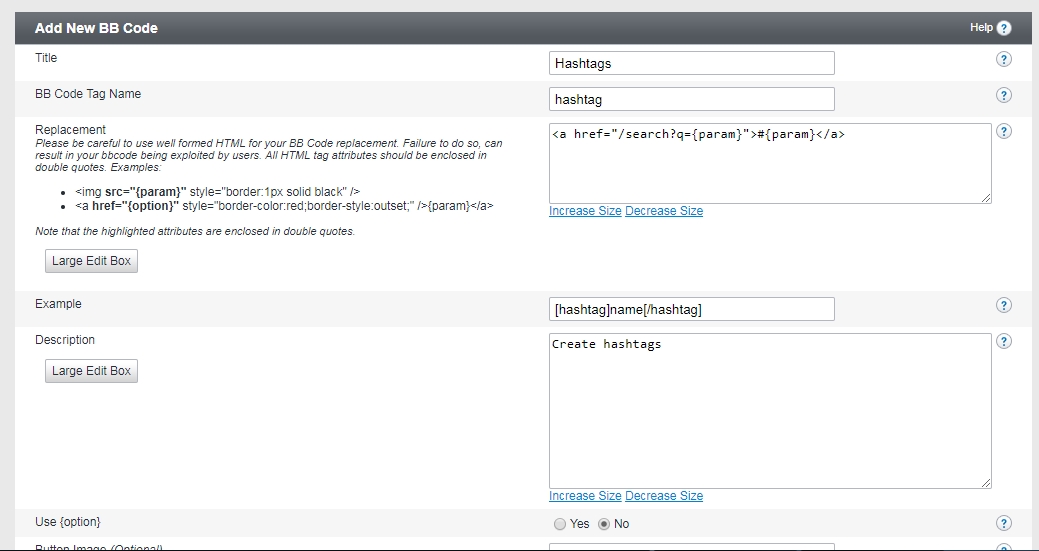
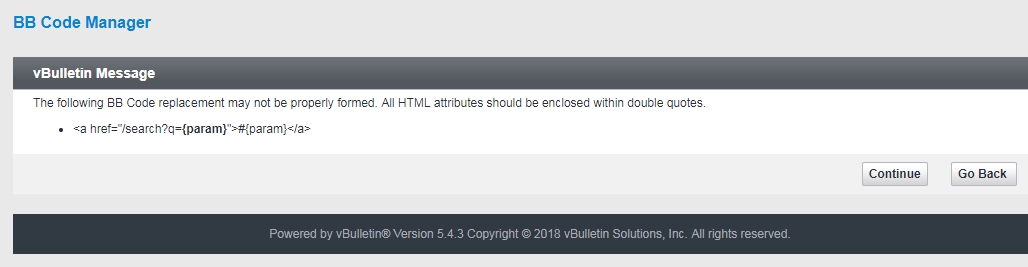
Comment
-
Hmm figured out .. this works ..
Funny why your version worked for you but not for me ..Code:<a href=www.site.com/search?q="{param}">#{param}</a>
Edit .. Even this works ..
Code:<a href="/search?q="{param}"">#{param}</a>Comment
-
Creating another reply because this is front-end discussion ..
At the front end, it does not work
When I add a hashtag to a post, it does show #item with a link on it but the link shows http://www.site.com/search?q=
No parameters. It should rather show http://www.site.com/search?q=item
Please advise. Thanks!Comment
-
It ultimately does not work as the double quotes are in the wrong places. Keep the original code and just click the Continue button when the error message appears and see what happens.My Amazon Affiliate Link
Fast vBulletin VPS Host:
This site is hosted by IONOSComment
-
Oh wow man! I thought hitting Continue would just take me back to the main admin panel. It works now after hitting Continue. Sometimes I feel like dumb.
Thanks for the help Glenn, you really rock VB
Comment
-
Glad to be helpful!
My Amazon Affiliate Link
Fast vBulletin VPS Host:
This site is hosted by IONOSComment


-
 Reply to some ideas for new modsin Chit Chat
I finally created a mod that allows you to add an icon to each post with options for sharing on other platforms. I honestly thought it was absurd that...
Today, 03:59 AM -
 Hi Glenn, what do you think about adding "Like Counts" similar to "Like Counts on Postbit and Profile" (when this mod is in use) in...Yesterday, 11:28 PM
 -
Comment